
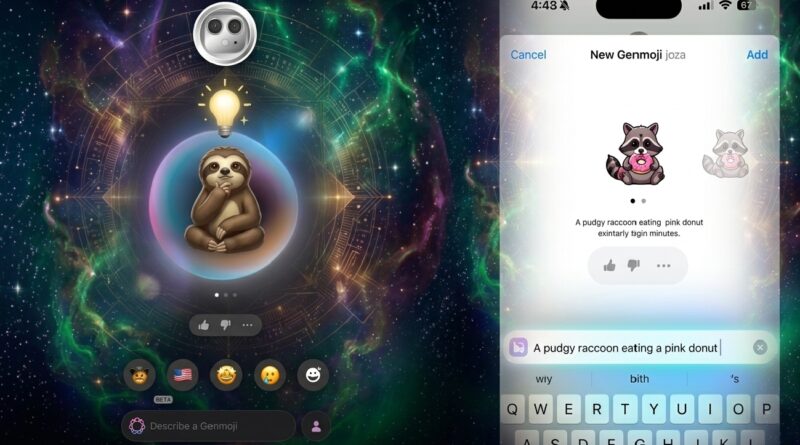
Apple Intelligence Overhaul: iOS 27 to Introduce Predictive “Suggested Genmoji” and a Fully Customizable Camera App
The race for mobile personalization is taking a massive leap forward. Apple is preparing to bring sweeping changes to the iPhone interface with its upcoming iOS 27 software update. According to details shared by Bloomberg’s Mark Gurman, the next major release will take personalization to an entirely new level.
Driven by Apple Intelligence, the headline upgrades include an on-device, predictive “Suggested Genmoji” engine and a groundbreaking, widget-based camera design that lets users build their own photography interface from scratch.
Suggested Genmoji: AI Customization That Predicts What You Want
When Apple first debuted Genmoji, it allowed users to generate entirely original emojis using simple text prompts. In iOS 27 and iPadOS 27, Apple is transforming this into a proactive, context-aware experience called Suggested Genmoji.Instead of waiting for you to type out a precise text description, the system uses advanced on-device intelligence to continuously evaluate the tone, keywords, and context of your ongoing text conversations.
- Contextual Integration: If you are actively texting a friend about an upcoming birthday dinner, the iOS keyboard will automatically surface custom-generated cake or confetti Genmoji variants directly inside your predictive text bar.
- Personalized by Your Photos: The new toggle discovered in the keyboard settings reveals that Suggested Genmoji will analyze your personal photo library and your commonly typed phrases. This means the AI can intelligently generate custom graphics that match the likeness of your pets, hobbies, or frequently referenced objects.
- Privacy-First & Optional: Because this feature relies entirely on scanning personal media and keyboard logs, Apple is keeping the capability fully optional. Users who prefer not to have automated graphics generated from their private data can simply leave the setting toggled off.
Camera App Layout: Build Your Own View finder Interface
For nearly a decade, the stock iPhone Camera app has maintained a rigid, uniform layout. iOS 27 is set to break that tradition by treating camera functions—like flash, exposure, timers, resolution, and depth-of-field—as modular, rearrangeable widgets.Instead of sticking to the traditional camera top bar where features like Flash, Live Photo, and Night Mode are permanently fixed, iOS 27 introduces a dynamic layout overhaul.
This optional advanced configuration lets smartphone photographers construct a workspace tailored entirely to their unique shooting habits, putting controls like Exposure, Resolution, or Depth-of-Field exactly where they want them.
- The Add Widgets Tray: Swiping up from the bottom of the screen reveals a transparent panel organized into three distinct categories; Basic, Manual, and Settings. Users can drag their most-used functions to a row along the top of the viewfinder.
- Mode-Specific Profiles: Your layout preferences are isolated by shooting mode. This ensures that a specialized manual setup built for Portrait mode won’t interfere with your standard Video or Photo layouts.
- Ergonomic Refinements: To make adjustments easier to execute single-handedly, Apple is reportedly shifting the primary controls menu from the top-right corner down to a more accessible spot right next to the physical shutter button.
A Broader Push for System-Wide AI
These upgrades highlight Apple’s ongoing effort to move Apple Intelligence away from manual, prompt-heavy interactions and toward seamless, background automation. By processing these tasks locally on-device, the upcoming operating system aims to deliver highly personalized real-time results without compromising user privacy.
Frequently Asked Questions (FAQs)
How does Suggested Genmoji differ from the original Genmoji feature?
The original feature required users to type out a text prompt manually to create a custom emoji. Suggested Genmoji is predictive—it uses on-device AI to scan your conversation context and photo library to offer pre-made, personalized emoji designs automatically as you type.
Will Apple have access to my photo library to create these custom emojis?
No. The Genmoji engine runs entirely on-device. Your photo library and text messages are processed locally on your iPhone, meaning your personal data remains private and is not uploaded to cloud servers.
Can I turn off the automatic Genmoji suggestions if I don’t want them?
Yes. Suggested Genmoji is entirely optional. Apple has included a dedicated toggle switch inside the iOS 27 keyboard settings menu, allowing users to turn the feature on or off at any time.
Will the new customizable Camera app interface be mandatory?
No. The customizable widget layout is an opt-in “advanced” configuration. If you choose not to modify your settings, the Camera app will default to the standard, familiar layout featuring the traditional placements for flash, night mode, and live photos.