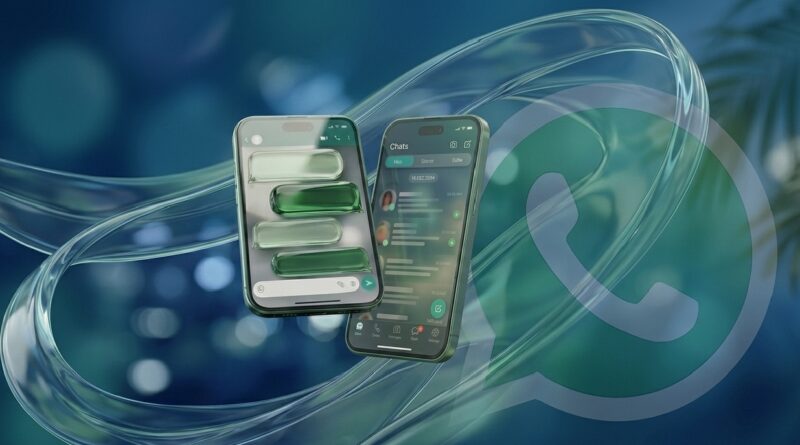
WhatsApp Liquid Glass Update (May 2026): New Design Features Revealed!
For over a decade, the WhatsApp experience has been defined by a familiar, “boxed-in” aesthetic: solid green headers, white (or dark) backgrounds, and rigid message bars. But as we move through 2026, a massive visual shift is underway.
Internal leaks and beta previews have revealed a stunning new design language dubbed “Liquid Glass.” It’s not just a minor paint job; it’s a complete rethinking of how we interact with our messages.
What is the “Liquid Glass” Design?
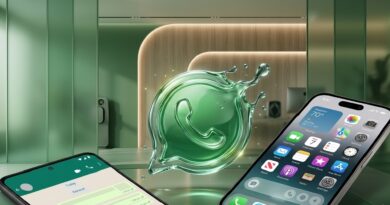
Inspired by the translucency of modern operating systems like iOS 26, Liquid Glass moves away from flat, solid colors and embraces depth, blur, and light. Instead of buttons sitting on top of a background, the interface feels like a series of layered, frosted glass panes. The goal? To make the app feel lighter, more modern, and less cluttered.
The 3 Biggest Changes Coming to Your Chats:
- The Floating Chat Bar: The most radical change is the message input field. Instead of being “stuck” to the bottom of your screen, the chat bar now floats like a pill-shaped island. It uses a semi-transparent material that lets your wallpaper peek through.
- Transparent Navigation: The solid header at the top of your chats is disappearing. In its place is a soft, transparent fade. As you scroll, your messages glide smoothly under the status bar, creating a truly edge-to-edge immersive experience.
- Dynamic Reflections: The “Liquid” in the name refers to how the UI reacts to your wallpaper. If you have a vibrant, colorful background, the frosted glass elements will subtly reflect those colors, making every user’s WhatsApp look unique.
Is This the End of Chat Bubbles?
While the traditional “bubble” isn’t going away entirely, its role is changing. In the Liquid Glass era, the focus is shifting away from the container and toward the content.
By removing the heavy borders and solid bars that have defined the app for years, WhatsApp is making the conversation feel like it’s happening directly on your wallpaper. The “bubble” is becoming less of a box and more of a soft highlight.
Why is Meta Making This Change?
Modern smartphones are getting larger and more powerful, but our app designs have stayed “flat.” Meta is pushing Liquid Glass to:
- Improve One-Handed Use: Floating elements are easier to reach on tall screens.
- Match Premium Hardware: High-end OLED screens look best when displaying depth and transparency.
- Keep Up with Competition: With Telegram and iMessage constantly refining their visuals, WhatsApp needs to look “premium” to keep its billions of users.
When Can You Get It?
As of May 2026, the Liquid Glass rollout is gradual.
- iPhone Users: Many on the latest iOS 26 builds are already seeing the translucent tab bars and updated voice note players.
- Android Users: Testing is currently in the “internal” phase. Expect a beta rollout for Android users in the coming months as Meta optimizes the “glass” effect for a wider range of screen types.
Final Thoughts
The Liquid Glass update represents the biggest visual leap in WhatsApp’s history. It’s a move toward a more “invisible” interface where the tools disappear, and only the conversation remains.
Frequently Asked Questions (FAQs)
What exactly is the WhatsApp “Liquid Glass” update?
Liquid Glass is a new design language that replaces solid interface elements (like the top bar and chat box) with translucent, frosted-glass effects. It is designed to make the app feel more immersive by letting your chat wallpaper show through the UI.
Is the Liquid Glass design available for Android and iOS?
Currently, the design is most visible in WhatsApp Beta for iOS 26. However, internal testing for Android is underway. Meta typically aims for “feature parity,” meaning Android users should expect similar glass-like transparency effects later in 2026.
How do I enable the new Liquid Glass interface?
As of May 2026, you cannot manually toggle this on in the standard app. You must be a member of the WhatsApp Beta Program (via TestFlight on iOS or Google Play Beta on Android). Even then, Meta is rolling it out via a “server-side” update to select users first.
Will this new design make WhatsApp slower?
No. While transparency effects (blur and glass shaders) require more graphical power, modern smartphones are optimized for these visuals. Meta has been refining the code to ensure that the “Liquid” transitions remain smooth without draining your battery.
Can I turn off the transparency if I don’t like it?
WhatsApp hasn’t confirmed a “Classic Mode” yet. However, usually, if you use a solid-color wallpaper, the transparency effect becomes less noticeable, mimicking the traditional flat look.
What do you think? Do you prefer the classic, solid look, or are you ready for the floating, frosted future?
Note: This article is based on the latest leaks and beta discoveries as of May 2026.